The standalone macOS and Windows utility is designed to read .ptx files without Pro Tools installed, offering a way to retrieve material from older and parallel sessions.
Sparks Audio has released ClipMap, a standalone utility designed to browse and retrieve material from Pro Tools .ptx sessions without opening those projects in Pro Tools. The company says the application is available for macOS on Apple Silicon and Intel systems, as well as Windows, and is intended to reduce repeated switching between projects when inspecting session material.
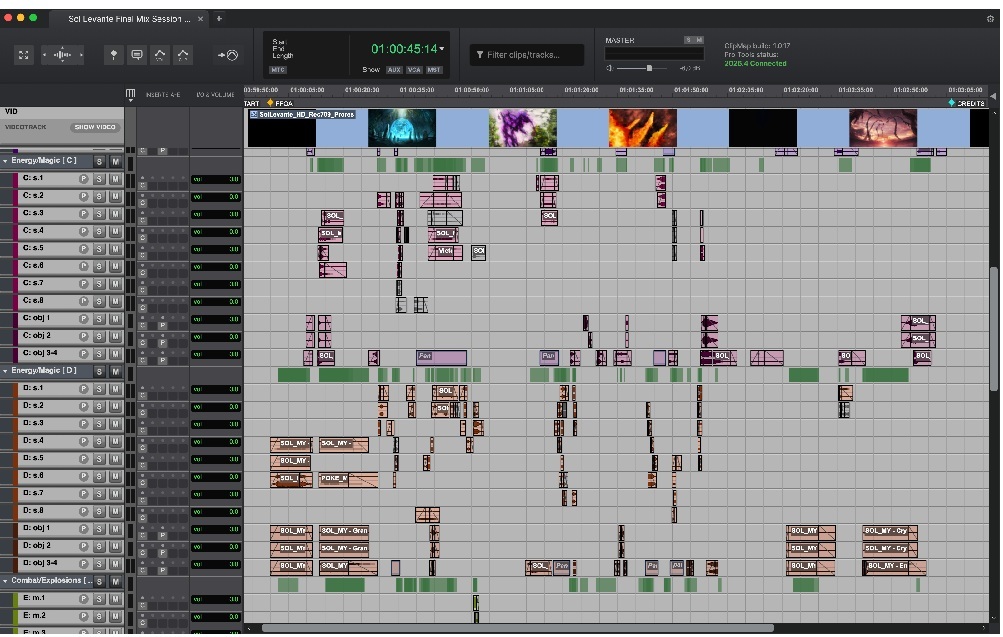
According to Sparks Audio, ClipMap reads .ptx files directly and can access their contents without Pro Tools installed. It can open multiple sessions in browser-style tabs, with playback, solo and mute controls for auditioning material. Users can search clip names, memory locations and transcribed dialogue, with matching sections highlighted on the timeline; audio can then be dragged into a Pro Tools timeline.
The tool could reduce the need to reopen legacy, alternate or parallel sessions simply to locate takes, sound effects or other reusable assets. ClipMap operates in read-only mode, which may suit source-session inspection where the original .ptx project is not to be altered. Sparks Audio says it requires neither an iLok nor a recurring subscription.
ClipMap Pro adds synchronized video playback, clip-gain, volume-automation and session-plugin information, along with other session details, Sparks Audio says. The Pro edition also supports spotting clips with track mapping while retaining fades, clip gain, volume automation and panning—capabilities that may be useful in picture-post workflows working with source-session edit data.
Sources
Sparks Audio Launches New ClipMap For Pro Tools Workflows – ProSoundWeb